9 posts tagged with "self-hosted"

View all tags

Why I Built xAgent

· 15 min read

I started building xAgent in April 2025.

The original idea was straightforward: build a task-oriented Agent that could run work on its own and turn AI into real automation. Looking back, that sentence sounds simple. Most of what I have done over the past year has been filling in everything hidden inside the words “run work on its own.”

The first version used a single Agent. I quickly ran into a problem: once the prompt focused its attention on one kind of work, the Agent could do that work well but handle other tasks terribly. Fix one side and it would forget the other. Ask it to pay attention to everything and it would end up paying proper attention to nothing.

That led me to multiple Agents, each responsible for a different part of the work and able to collaborate with the others. The idea worked, but as soon as they started running together, the next problem became obvious: tokens were too expensive.
xAgent 0.0.9.beta Is Available: Separate Administration, a Unified Session Workspace, and Session Prompts

· 4 min read

xAgent 0.0.9.beta is now available. This release addresses a boundary that becomes increasingly important as a deployment grows: administering the system and using it for daily work should not share the same entry point and navigation.

The administration console now lives under /admin, while /app focuses on personal sessions, files, settings, and usage. Web and desktop also share one two-column session layout, and per-session prompts can be edited directly and applied from the next model turn.

xAgent 0.0.8.beta Is Available: Incremental Backup, Disaster Recovery, and Cloud Storage

· 5 min read

xAgent 0.0.8.beta is now available. This release extends storage governance beyond where files live to how data is backed up, how an instance recovers after a failure, and how external storage is made available to users. It also improves file reuse in sessions, multilingual Skill governance, and local storage cleanup.

The headline change is online incremental backup. Backup jobs can run while xAgent is serving users, and restore data can be downloaded and verified online. Only the final data-directory cutover requires downtime.

How xAgent Backup and Disaster Recovery Work: Incremental Snapshots and recovery.yml

· 7 min read

A self-hosted backup needs to answer more than whether bytes reached remote storage. It needs to show that the data can be restored, how much downtime restoration requires, and whether a failed cutover can return to the previous state.

xAgent 0.0.8.beta turns those questions into a verifiable procedure: create encrypted incremental snapshots while the service is running, download and verify restore data online, switch directories after shutdown, then confirm or roll back.

Route Sensitive AI Agent Work to an Internal LLM by Agent and Session

· 9 min read

An organization does not need to choose between running every task on an internal model and sending every task to a third-party API. xAgent can create an Agent for sensitive work that defaults to an internal model, then let its Sessions use the matching model configuration: general work can use an external model, while restricted work starts with a model configuration that points to an internal service. The model configuration selects the final Provider, so the two workloads use separate model paths.

This is a specific way to configure an Agent around a data boundary. It complements the general Agent Management workflow; it is not, by itself, an absolute claim that every byte of data stays inside the company. This article explains how to establish the boundary, verify it, and understand what else must be controlled.

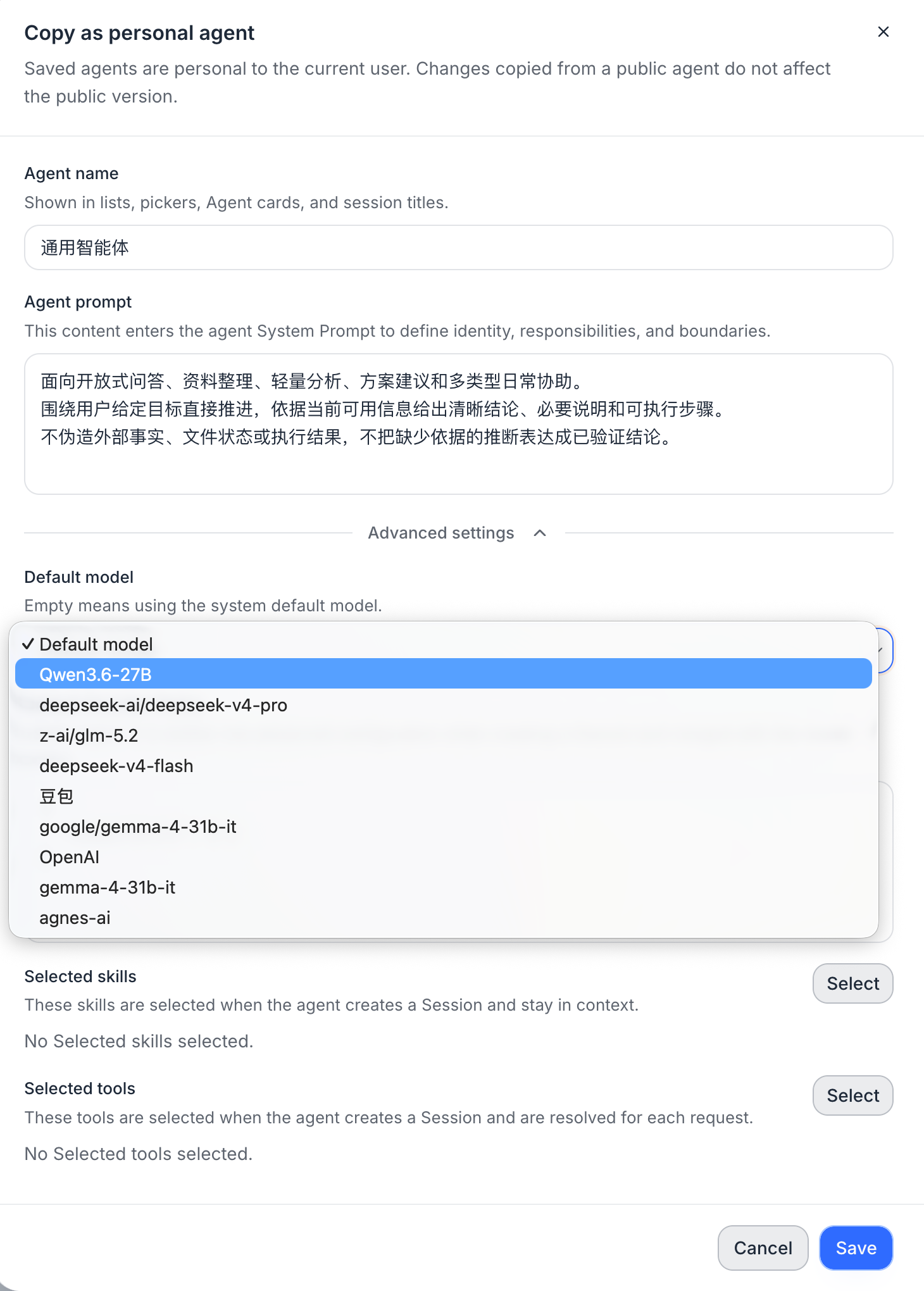
Copying an xAgent as a personal Agent, with the default model selector in Advanced settings

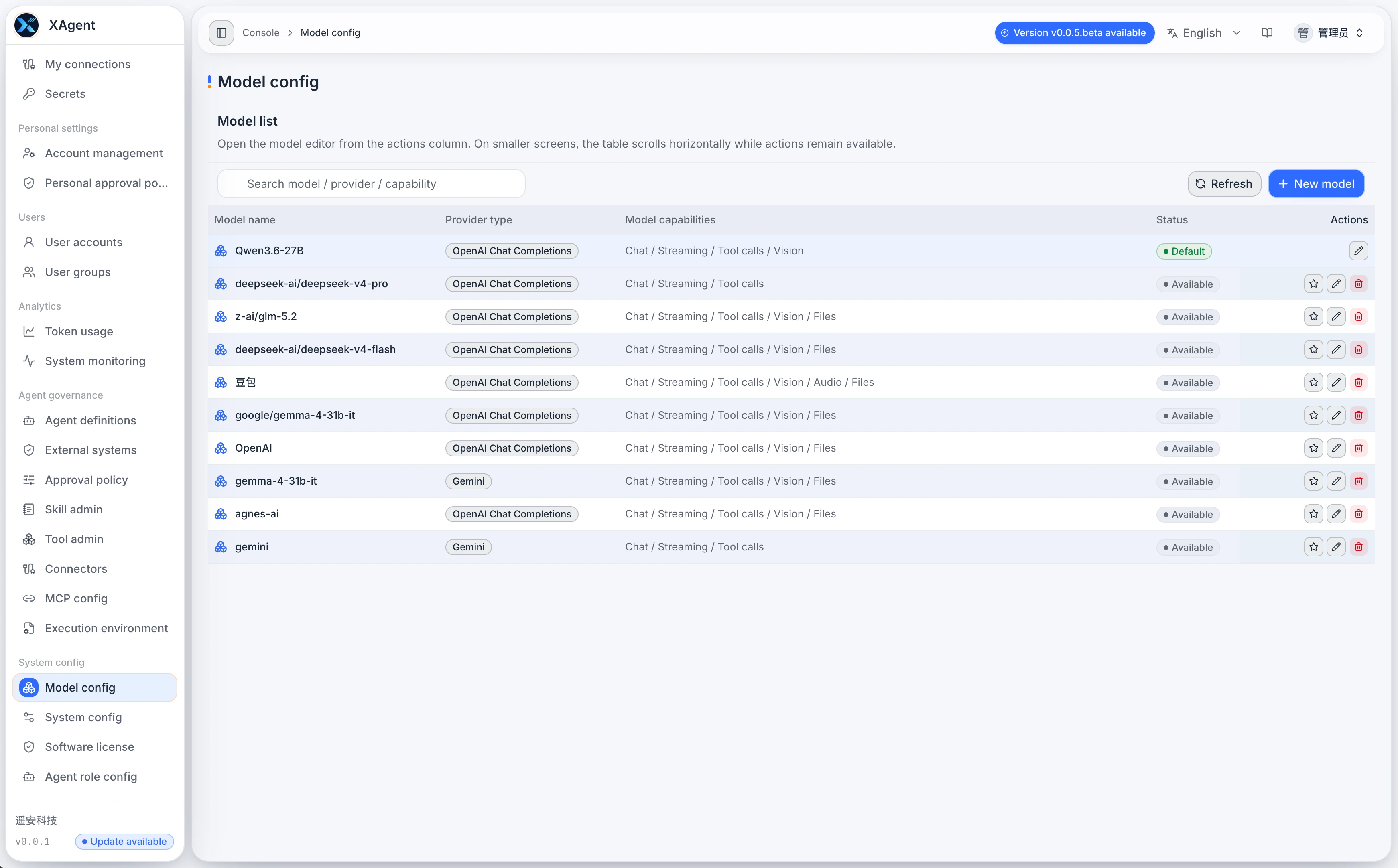
The xAgent Model Configuration page showing the model list, Provider, connection details, and capability options

xAgent 0.0.7.beta Is Available: File Storage, Team Sharing, and Desktop Client

· 4 min read

xAgent 0.0.7.beta is now available. This release makes a substantial upgrade to file storage and team collaboration, introduces the first Desktop Client release at 0.0.1, and continues to improve model caching, Provider compatibility, and image recognition.

This is still a beta release. The sections below summarize the main changes and do not replace the formal installation and upgrade instructions.

xAgent 0.0.6.beta Is Available: More Reliable File Handling and Long-running Tasks

· 5 min read

xAgent 0.0.6.beta is now available. This release focuses on a foundational part of task quality: making the path from file upload to reading, processing, and delivery more reliable.

xAgent is not designed to simply attach files to a chat. It is designed to let Agents keep working on the server. For meeting notes, contracts, reports, spreadsheets, presentations, and operational materials, correct recognition, location, and reuse of files directly affect whether a task can be completed reliably.

This is still a beta release. This post explains what is changing for users preparing to deploy or upgrade; it does not replace the formal installation and upgrade instructions.

Should an AI Agent Run on a Personal Computer or a Server?

· 5 min read

Many people first try an AI Agent as a desktop tool. That works well for experiments, coding, and one-off tasks. But once an Agent reads files, calls external systems, waits for approval, generates reports, or needs to be used repeatedly by a team, the question is no longer only whether the model is capable enough. It is where the Agent should run.

This article is not about choosing a particular model. It explains when a personal computer is sufficient, when a server-side deployment is the better fit, and why teams that depend on Agents for ongoing work usually need a long-running service.

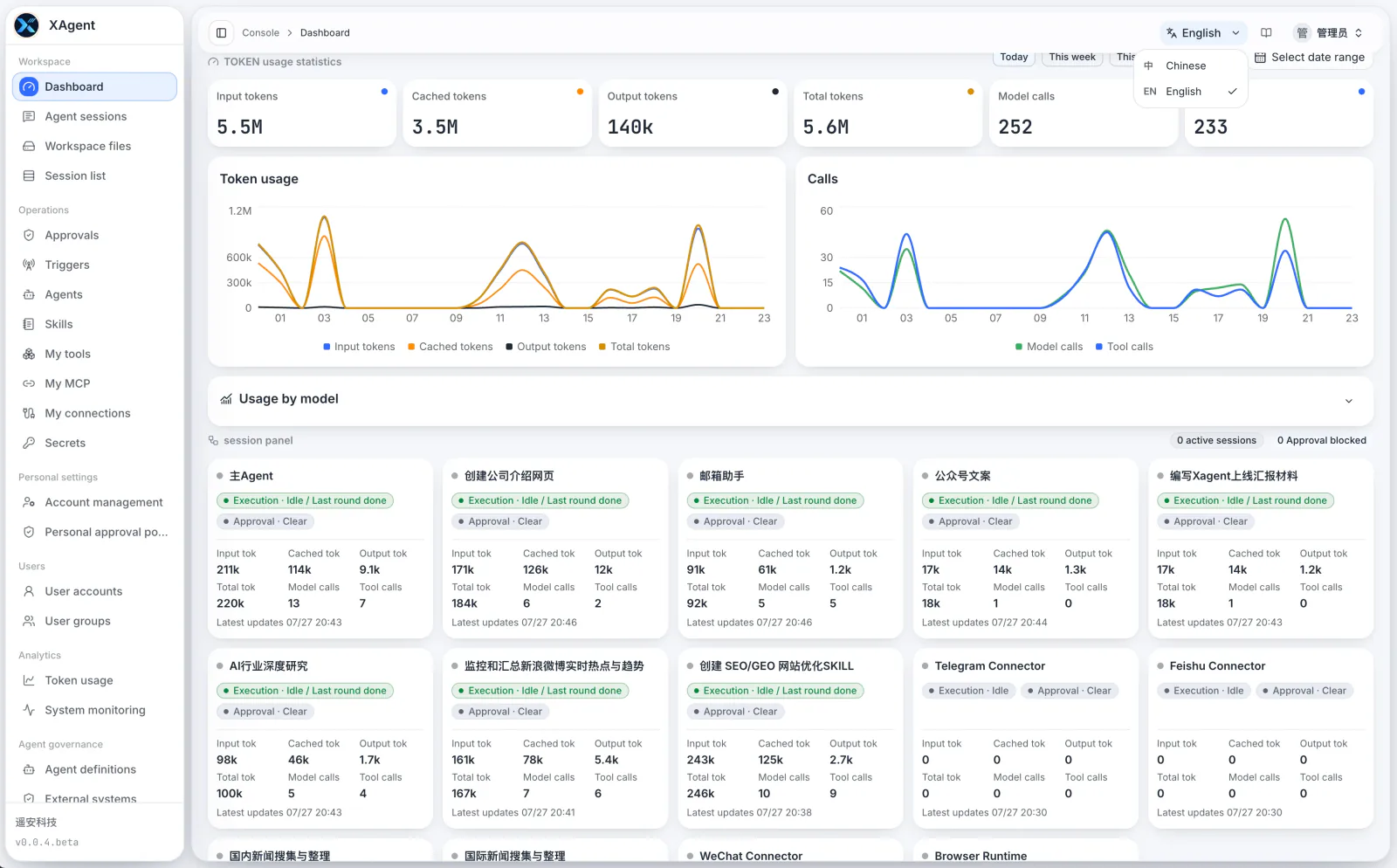
The xAgent server-side dashboard showing centralized model usage, Sessions, and Tool calls

xAgent vs. WorkBuddy, QoderWork, Codex, and OpenClaw

· 7 min read

Customers often ask how xAgent differs from WorkBuddy, QoderWork, Codex, and OpenClaw.

The wrong answer is that xAgent is stronger than all of them. These products do not solve the same problem. The useful comparison starts with who will use the product, where tasks run, whether work involves a team and business systems, and who owns the security and operational boundaries.